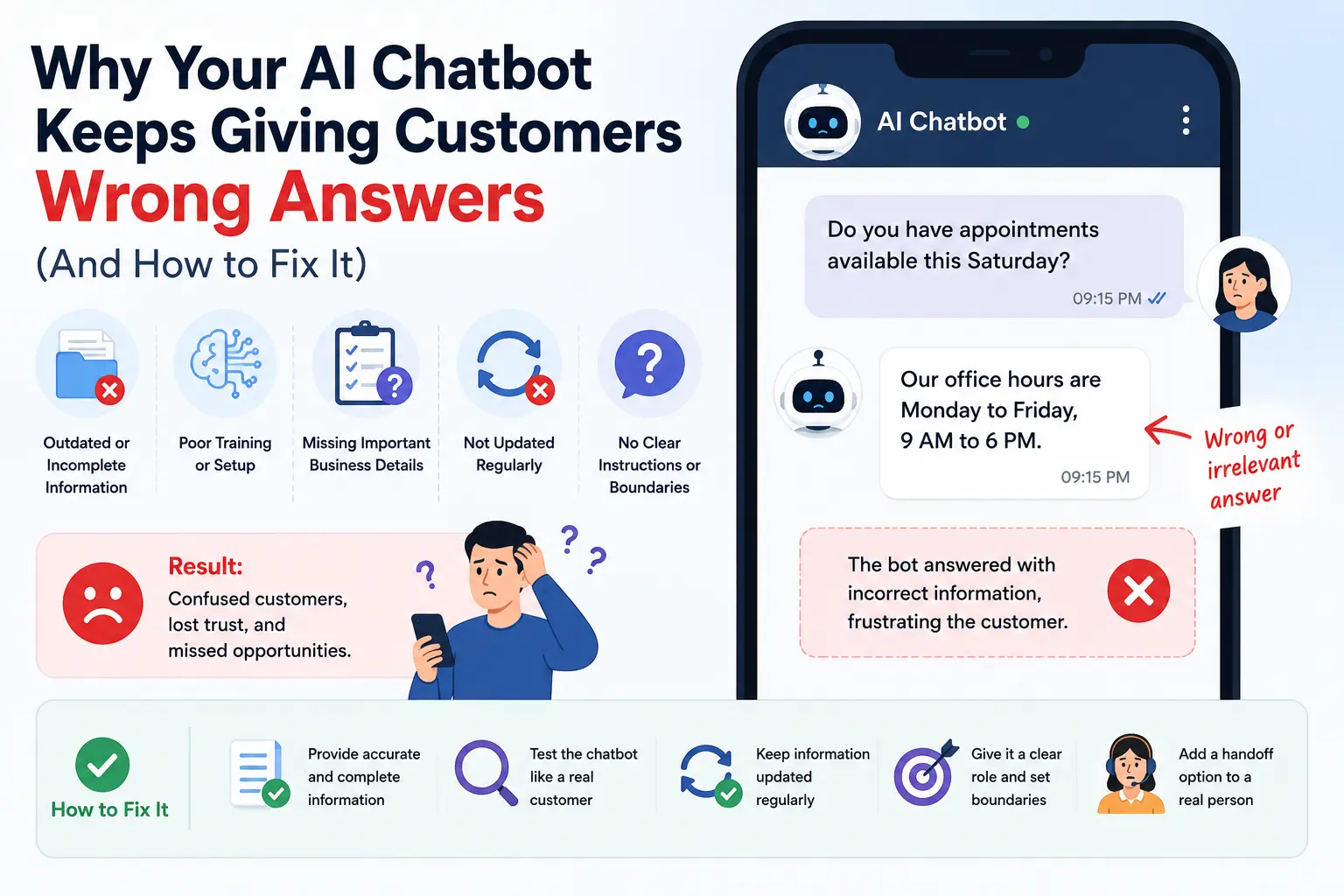
Imagine this: a customer lands on your website at 9 PM, after your office has closed. They type a quick question into your shiny new AI chatbot — “Do you have appointments available this Saturday?” The chatbot replies with something completely unrelated, like a generic line about your business hours from six months ago.
The customer doesn’t wait around to clarify. They close the tab and message a competitor instead.
You’ve probably experienced this from the other side too — excited to finally have “AI” working for your business 24/7, only to find out a week later that it’s been giving customers outdated prices, wrong service details, or confusing answers. The chatbot felt like a smart investment. Now it feels like a liability you’re almost embarrassed to have on your site.
The frustrating part is, the technology isn’t actually broken. Most chatbot mistakes come from how they were set up, not from AI itself being unreliable.
Why AI Chatbots Give Wrong Answers to Customers
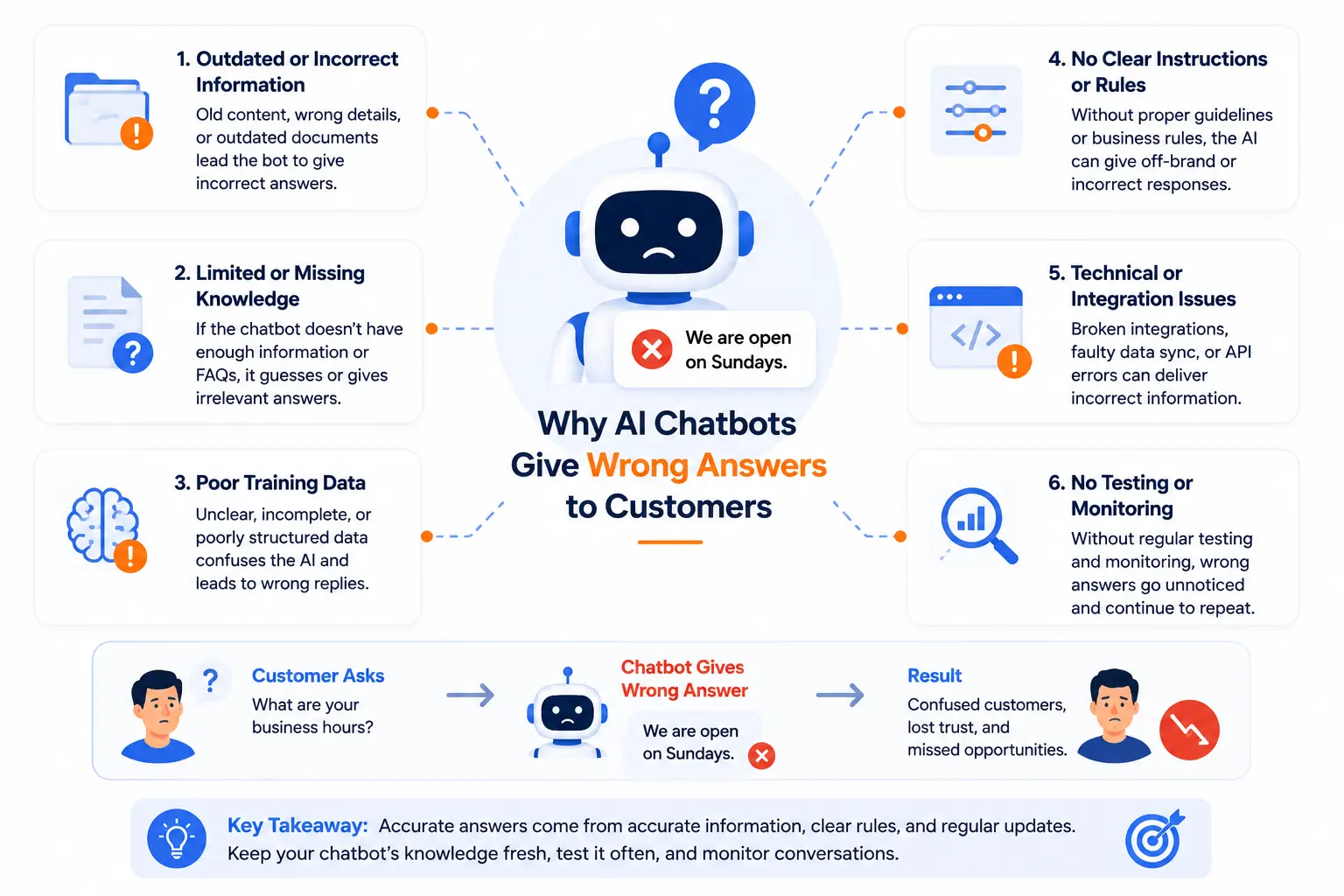
Here’s what usually happens. Most business owners assume a chatbot “just knows” about their business the moment it’s installed. In reality, a chatbot only knows what it’s been given — and most setups give it far less than people think.
Imagine a clinic owner who installs a chatbot widget, types in three sentences about their services, and turns it on the same day. The chatbot now has almost nothing to work with, so when a patient asks about insurance coverage or specific doctor availability, it either guesses, gives a vague non-answer, or pulls outdated information from whatever default content came with the tool.
This happens because chatbots work off whatever information — called their “knowledge base” — they’re connected to. If that information is incomplete, outdated, or never updated after launch, the chatbot has no way of knowing it’s wrong. It will answer confidently anyway, because that’s how these tools are designed to behave.
Common Mobile and Website Chatbot Setup Mistakes Small Businesses Make
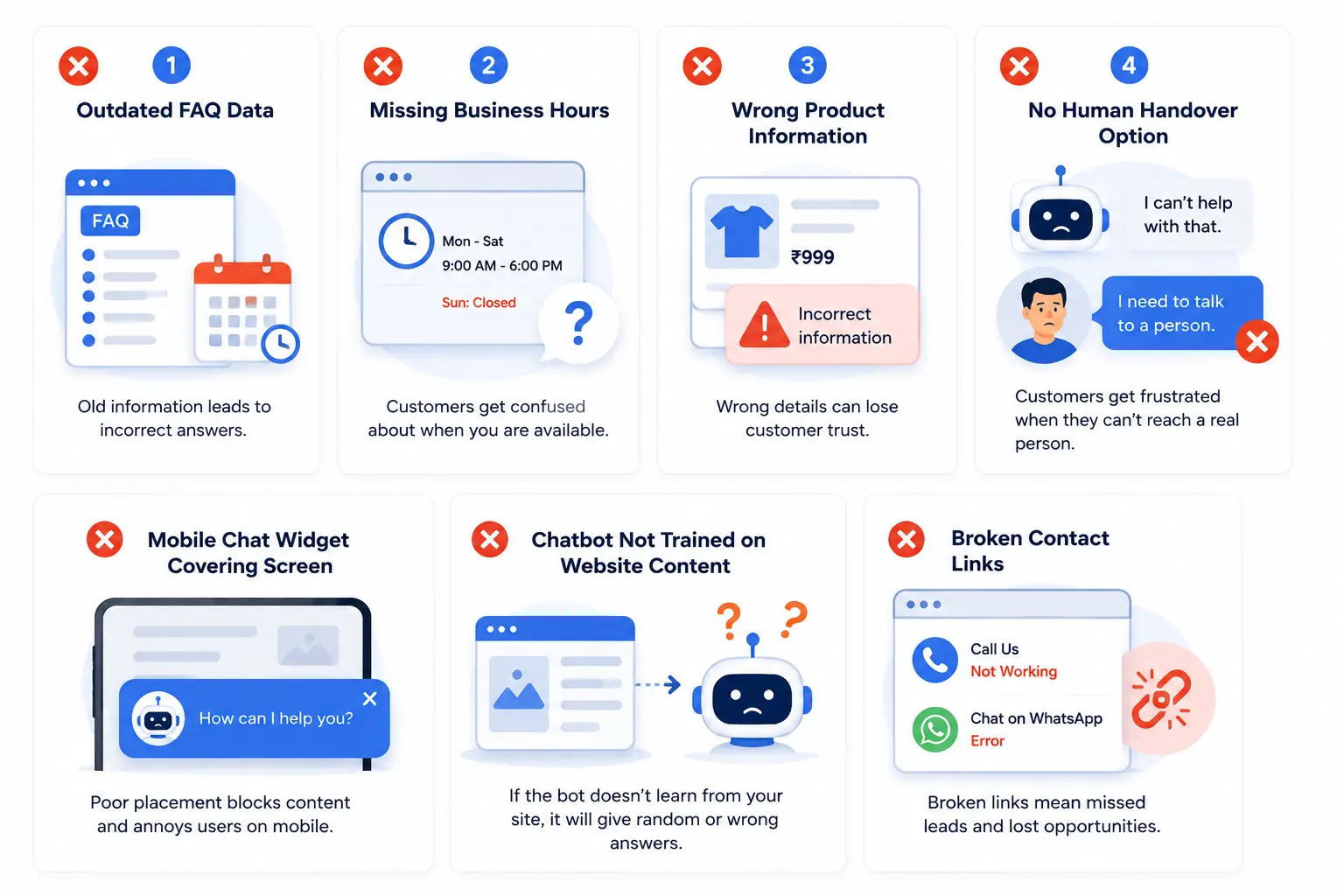
The mistake isn’t usually the AI tool itself — it’s how it gets set up and left unattended. Some of the most common issues:
- Feeding the chatbot outdated information — old pricing, old hours, services you no longer offer
- Never testing it from a customer’s point of view before launching it live
- Connecting it to a generic template instead of your business’s actual FAQs and policies
- Not updating it after business changes — new pricing, new staff, seasonal hours
- Giving it too broad a job — expecting it to handle billing disputes, bookings, and complex queries all at once
- No fallback option, so when the chatbot doesn’t know something, it guesses instead of directing the customer to a real person
Imagine a local restaurant that updates its menu seasonally but never updates the chatbot. A customer asks about a dish that was removed two months ago, and the bot confirms it’s available. The customer shows up expecting it, and now there’s an awkward, avoidable moment that didn’t need to happen.
How to Fix a Website Chatbot That Gives Wrong Information
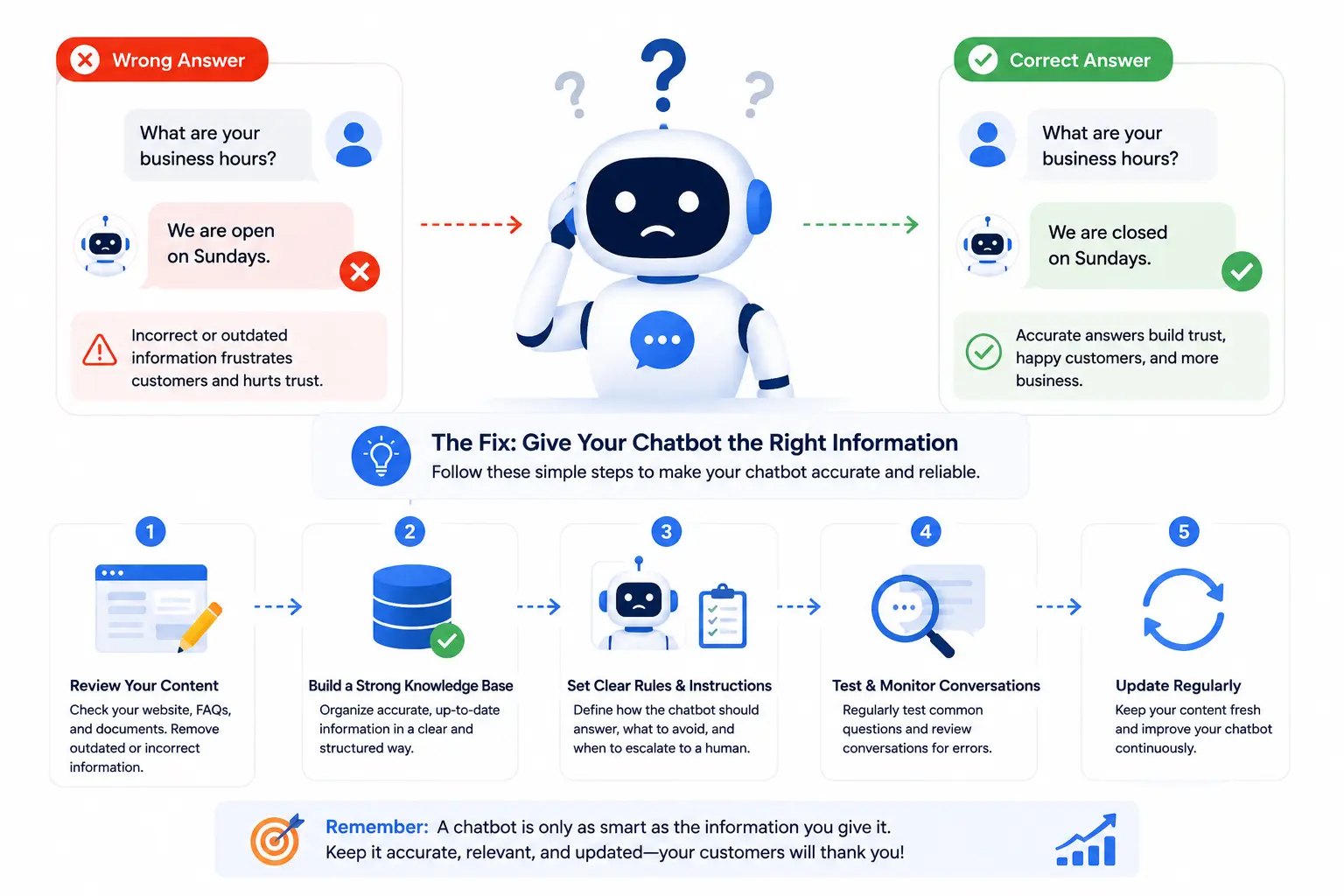
You don’t need to rebuild your chatbot from scratch. Most fixes come down to giving it better information and clearer boundaries.
1. Review what information it currently has access to.
Go through your chatbot’s knowledge base or settings and check if your hours, pricing, services, and policies are current. If you can’t remember the last time you updated it, that’s usually the root of the problem.
2. Test it yourself like a real customer would.
Ask it the questions your customers actually ask — about pricing, booking, location, returns, whatever applies to your business. If an answer feels off, that’s exactly what your customers are experiencing too.
3. Narrow its job.
Instead of expecting it to handle everything, give it a clear, limited role — answering FAQs, capturing contact details, or directing people to WhatsApp. A chatbot that does a few things well builds more trust than one that tries to do everything and gets things wrong.
4. Set up a clear handoff to a human.
Make sure that when the chatbot doesn’t know an answer, it says so honestly and offers a way to reach a real person — instead of guessing or repeating a generic response.
5. Put a reminder on your calendar to review it monthly.
Imagine a freelancer who updates their service packages every few months but forgets the chatbot exists. A simple monthly check — even just five minutes — keeps it accurate.
What Most Business Owners Overlook
Here’s the part most people miss: a chatbot doesn’t need to know everything to be helpful. It just needs to be honest about what it doesn’t know.
Most visitors won’t complain when a chatbot gives a wrong answer — they’ll simply lose a little trust and move on quietly, often without you ever finding out it happened. A chatbot that says “I’m not sure, let me connect you with our team” builds more confidence than one that confidently makes something up. Accuracy matters less than people expect — honesty about limitations matters more.
Tools & Resources
- Your chatbot platform’s analytics or conversation logs — Most chatbot tools (even free ones) let you review past conversations. This is the fastest way to spot exactly where customers are getting confused, because you can see the real questions being asked.
- A simple shared FAQ document — Keeping one updated Google Doc with your current hours, pricing, and policies, and using it as the chatbot’s main source of truth, makes updates faster and prevents outdated information from sitting unnoticed for months.
- WhatsApp Business as a fallback channel — For many small businesses in India, customers feel more comfortable continuing a conversation on WhatsApp rather than typing into a website pop-up. Setting your chatbot to hand off uncertain queries to WhatsApp can recover conversations that would otherwise be lost.
A Quick Action Step
Before doing anything else, open your own website chatbot right now and ask it three questions a real customer would ask — your pricing, your hours, and how to book or contact you. If even one answer feels outdated or off, that’s the exact issue your customers are quietly running into.
Frequently Asked Questions
My chatbot was working fine when I set it up. Why does it feel wrong now?
Businesses change — prices, hours, services — but chatbots don’t update themselves. If it hasn’t been touched since launch, it’s likely working off old information.
Should I just turn off the chatbot if it’s giving wrong answers?
Not necessarily. A chatbot with a narrower, well-defined job (like answering basic FAQs and capturing contact details) is often more useful than no chatbot at all. The fix is usually scope and accuracy, not removal.
How often should I update my chatbot’s information?
A quick monthly review works for most small businesses, with extra updates whenever your pricing, hours, or services change.
Can a chatbot replace WhatsApp or phone support for my business?
Not entirely. It works best as a first response — answering simple, repeated questions — while handing off more specific or sensitive queries to a real person through WhatsApp, call, or email.
My chatbot keeps giving generic answers instead of specific ones. What’s wrong?
This usually means it’s still running on default template content instead of being connected to your actual business details. It needs to be set up with your specific FAQs, not just left on default settings.
Is it expensive to fix a chatbot that’s giving wrong information?
Often not. Many fixes are about updating existing information and narrowing its role, not buying new tools. The cost is usually time, not money.
Key Takeaways
- AI chatbots only know what they’ve been given — incomplete or outdated setup is the most common cause of wrong answers
- Most issues come from chatbots never being updated after the initial launch
- A chatbot with a narrow, clear role performs better than one expected to handle everything
- Honest fallback responses (“let me connect you with our team”) build more trust than confident wrong answers
- A simple monthly review can prevent most customer-facing chatbot mistakes
Conclusion
Your chatbot isn’t broken — it’s likely just running on old or incomplete information that no one has revisited since it was first set up. Take a few minutes today to test it the way a real customer would, update anything that feels outdated, and make sure it knows how to hand off questions it can’t answer.
A chatbot that honestly says “I’m not sure, let me get you to someone who can help” will earn more trust than one that guesses — and that small shift can be the difference between a customer staying or quietly leaving.